
Claude Code vs GitHub Copilot: A Developer's Honest Comparison (2026)
Last tested: May 2026 · How we test →
GitHub Copilot is where most developers started with AI coding. Claude Code is where many power users end up. They look similar on the surface — both help you write code with AI — but they're built on completely different assumptions about what "AI coding assistance" means. This comparison cuts through the marketing to tell you which one actually fits your workflow.
The Verdict Up Front
Choose Claude Code if you need an autonomous agent that can tackle large, complex multi-file tasks from the terminal without hand-holding.
Choose GitHub Copilot if you want fast, reliable AI assistance woven into the editor you already use, at half the price, with enterprise-grade controls.
At-a-Glance Scorecard
| Criterion | Claude Code | GitHub Copilot | Winner |
|---|---|---|---|
| Agentic autonomy | ★★★★★ | ★★☆☆☆ | Claude Code |
| Code autocomplete | ✗ None | ★★★★★ | Copilot |
| Editor compatibility | Terminal + JetBrains ext | VS Code, JetBrains, Neovim, Visual Studio, Xcode | Copilot |
| Multi-model support | ✗ Anthropic only | ★★★★☆ (Claude, GPT-4o, Gemini) | Copilot |
| Large codebase context | ★★★★★ (1M tokens) | ★★★☆☆ | Claude Code |
| GitHub PR integration | ★★☆☆☆ | ★★★★★ | Copilot |
| Enterprise & compliance | ★★★☆☆ | ★★★★★ | Copilot |
| Pricing value | ★★★☆☆ ($20/mo) | ★★★★★ ($10/mo) | Copilot |
| Privacy & data control | ★★★★☆ | ★★★☆☆ | Claude Code |
| Free tier | ✗ None | ✓ Students & OSS | Copilot |
Scored using our 8-criterion testing methodology.
Pricing Comparison
| Plan | Claude Code | GitHub Copilot |
|---|---|---|
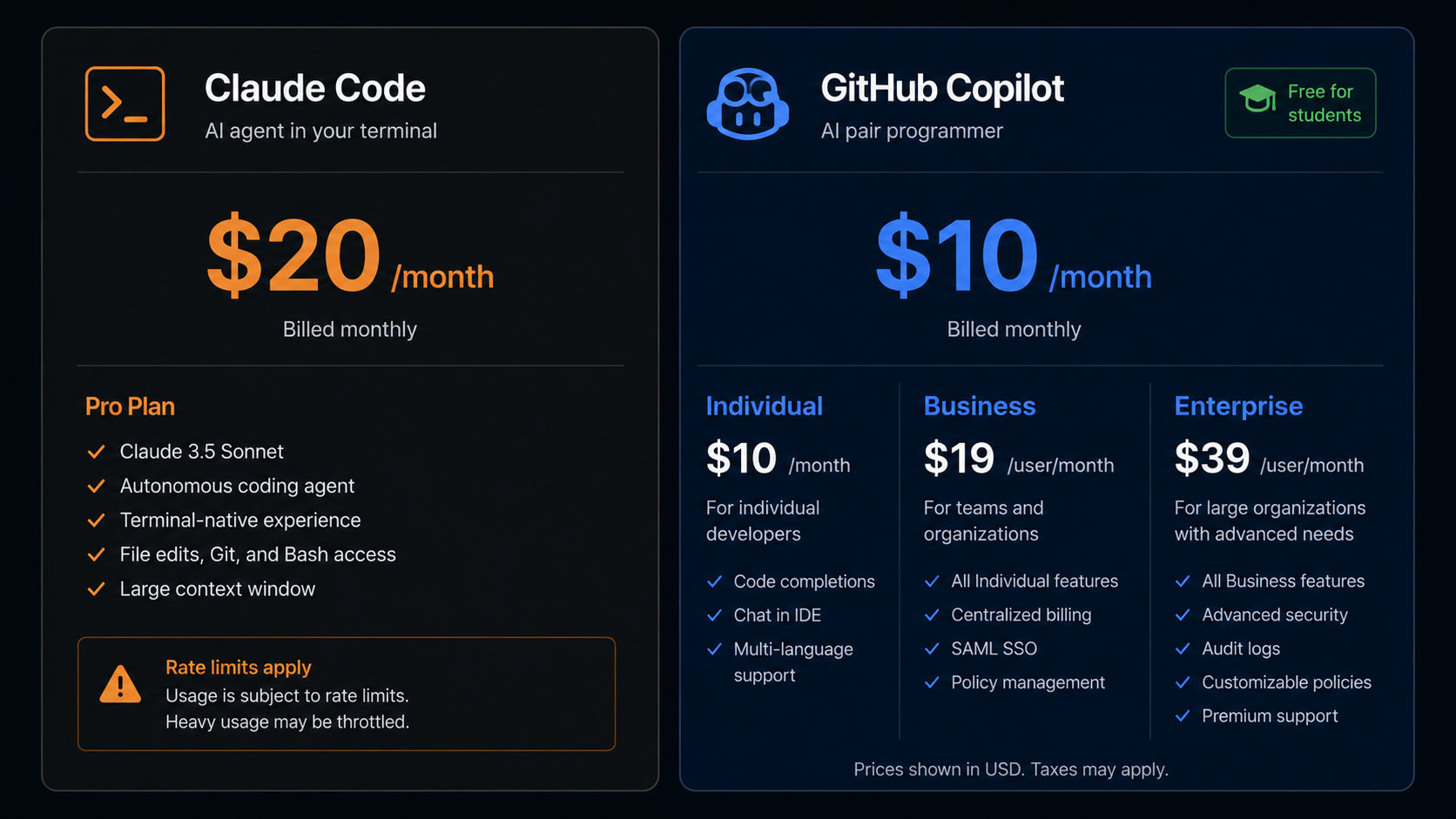
| Free tier | None | Free for verified students & open-source maintainers |
| Individual | $20/month | $10/month |
| Business | Via Anthropic API | $19/user/month |
| Enterprise | $100–200/month (Max) | $39/user/month |
| Models included | Claude (Anthropic only) | Claude Sonnet, GPT-4o, Gemini (switchable) |
Copilot is half the price at the individual level — a meaningful difference for solo developers. At enterprise scale, Copilot's per-seat pricing with SSO, audit logs, and policy controls is significantly more manageable than Claude Code's Max plan pricing.
Head-to-Head: Category by Category
Agentic Autonomy — Claude Code wins, decisively
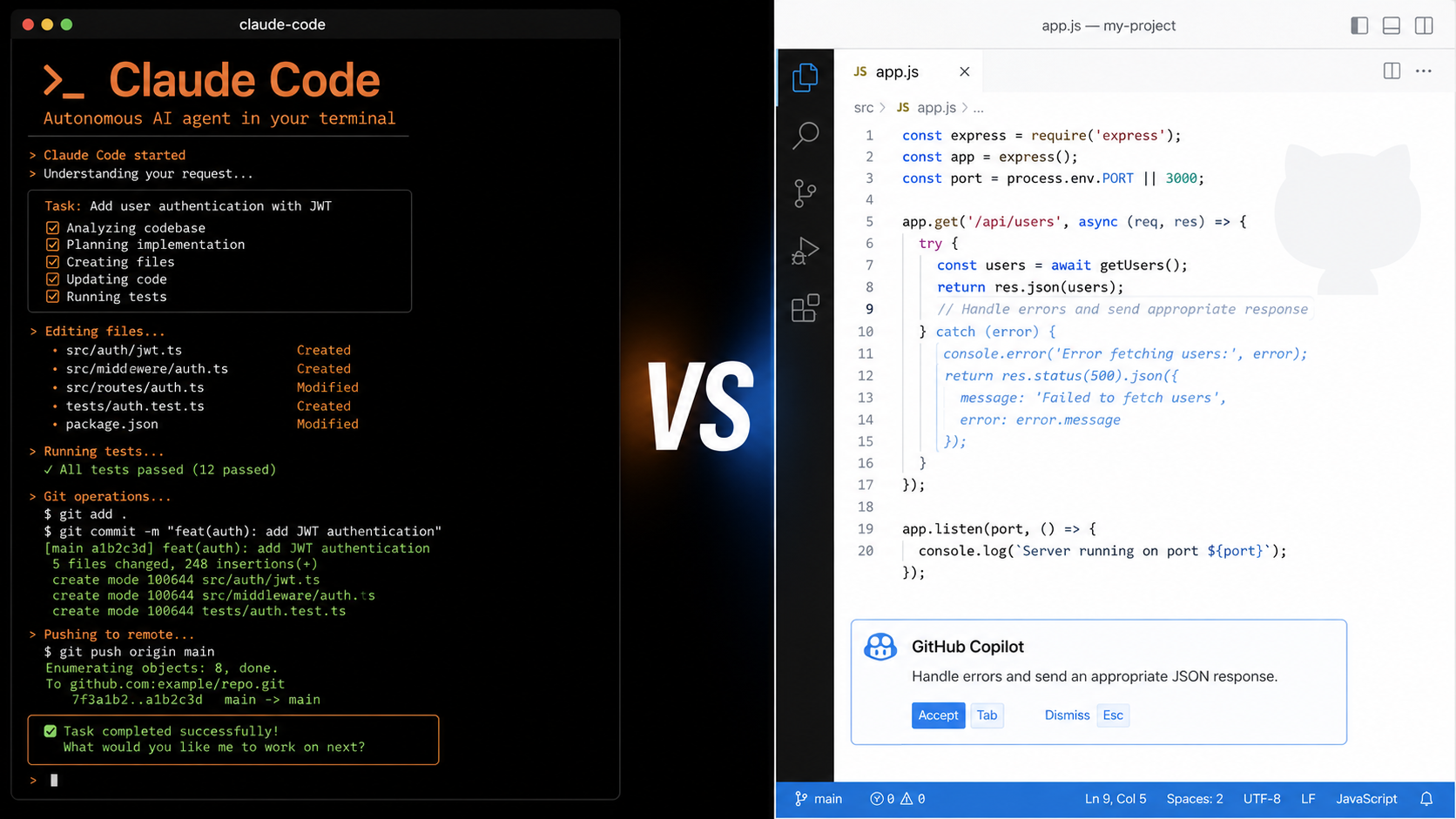
This is the starkest difference between the two tools. Claude Code is an autonomous agent: give it a task, and it reads your codebase, writes code, runs tests, fixes errors, and commits to Git — often without you typing another word. It scores ~80.8% on SWE-bench Verified, one of the highest marks recorded for any coding tool.
GitHub Copilot is fundamentally an autocomplete and chat tool. Its agent features exist but are limited to VS Code's Copilot Workspace — useful for scoped tasks but nowhere near Claude Code's depth of autonomous reasoning.
When it matters: Bulk refactors across dozens of files, automated test generation at scale, multi-step architectural changes.
Code Autocomplete — Copilot wins, and it's not close
Claude Code has no autocomplete at all. Every interaction is prompt-driven: you describe what you want, it acts. There are no inline suggestions as you type.
GitHub Copilot invented modern AI autocomplete and still does it best at this price point. Suggestions appear in under 200ms, span multiple lines, understand the surrounding context, and adapt to your coding style over a session. For day-to-day coding — the majority of most developers' time — this matters enormously.
When it matters: Any routine coding session where you're actively writing code rather than orchestrating agentic tasks.
Editor Compatibility — Copilot wins
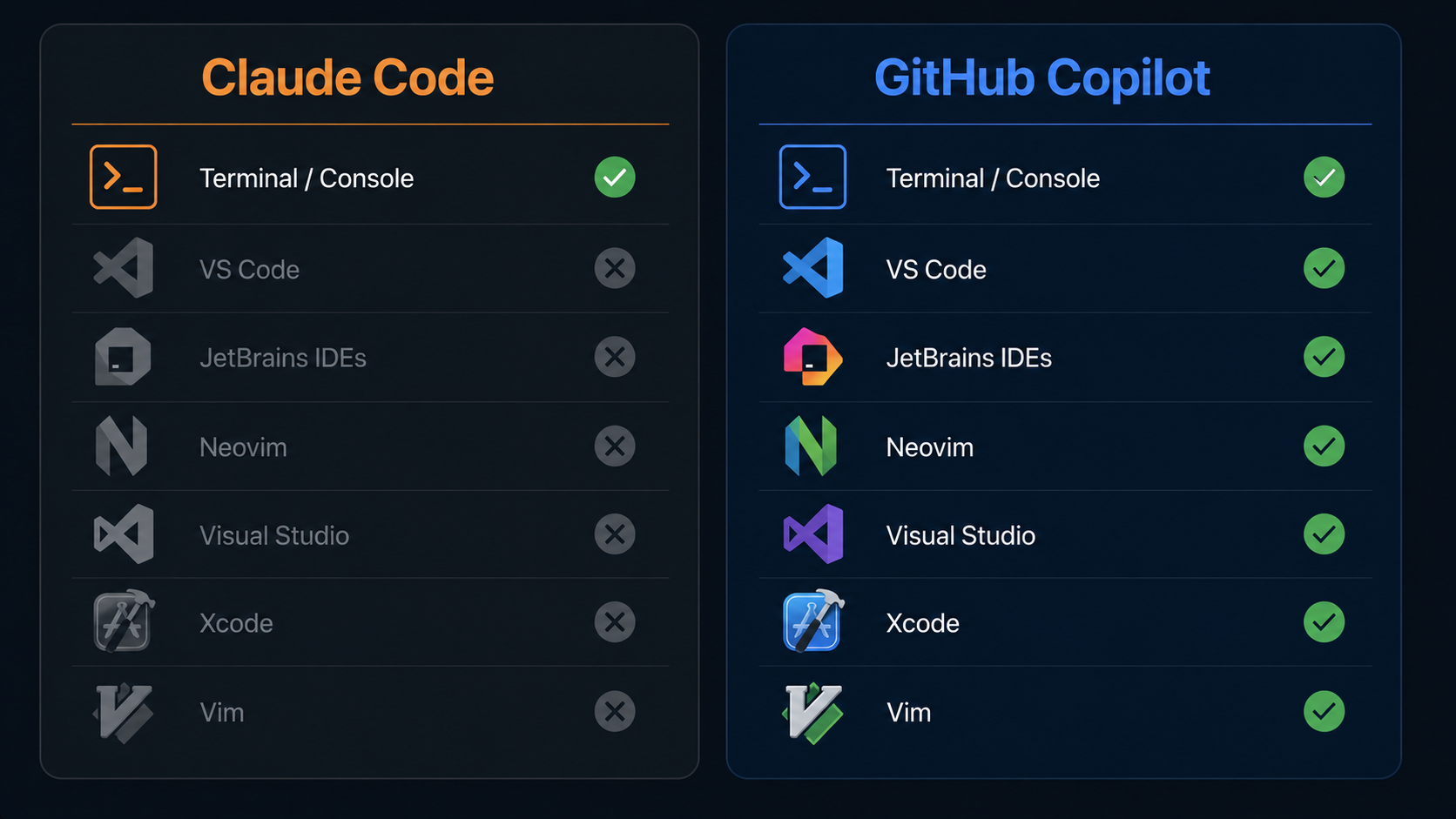
Claude Code runs in your terminal. It has extensions for VS Code and JetBrains, but its primary home is the command line.
GitHub Copilot works natively inside: VS Code, all JetBrains IDEs (IntelliJ, PyCharm, WebStorm, GoLand, Rider), Visual Studio, Neovim, Vim, Xcode, and Azure Data Studio. If you have a preferred editor, Copilot almost certainly supports it without any workflow change.
When it matters: Teams with mixed editor preferences, JetBrains-heavy shops, Neovim users, Windows developers on Visual Studio.
Multi-Model Support — Copilot wins
Claude Code uses Anthropic's Claude models exclusively. Full stop.
GitHub Copilot now supports multiple models in chat and completions: Claude Sonnet 4.5, GPT-4o, and Gemini — switchable mid-session. This matters for teams that want to experiment, optimise costs, or use specific models for specific tasks.
When it matters: Organisations with model-agnostic policies, teams running cost experiments, developers who want to try newer models as they release.
Large Codebase Context — Claude Code wins
Claude Code's context window extends to 1M tokens in beta, letting it load an entire medium-sized codebase in a single pass. Its cross-file reasoning is consistently stronger on complex, sprawling codebases.
GitHub Copilot's context is managed through indexing and snippet retrieval. It's effective for the files you're actively working in, but it doesn't maintain the same whole-project awareness that Claude Code's context window provides.
When it matters: Monorepos, large legacy codebases, debugging issues that span many modules.
GitHub PR Integration — Copilot wins
This is Copilot's home turf. It reviews pull requests inline on GitHub.com, suggests fixes directly in the diff, auto-generates PR summaries, and flags security vulnerabilities in CI. The entire integration lives natively inside GitHub's interface — no terminal, no additional setup.
Claude Code can interact with Git via the terminal, but it has no native GitHub PR review interface.
When it matters: Teams that do code review on GitHub, PR-heavy workflows, DevOps and security teams.
Enterprise & Compliance — Copilot wins
GitHub Copilot Business and Enterprise ship with: SSO via SAML, audit logs, seat management via GitHub Org settings, IP indemnification, content exclusions for sensitive files, and FedRAMP-aligned controls for government customers.
Claude Code's enterprise path runs through Anthropic's API, which requires more custom setup and lacks the out-of-the-box governance controls most IT/security teams expect.
When it matters: Regulated industries (fintech, healthcare, government), organisations with procurement compliance requirements, InfoSec-driven purchase decisions.
Pricing Value — Copilot wins
At $10/month individual vs $20/month, Copilot delivers more features per dollar for the majority of developers whose primary need is smart autocomplete and chat — not autonomous agents.
Claude Code earns its $20 for developers who use its agentic capabilities heavily. If you're mostly doing autocomplete and occasional chat, you're paying double for a feature set you're not using.
When it matters: Budget-conscious individual developers, companies doing cost-per-seat calculations.
Real-World Pain Points
Claude Code users complain about:
- Rate limits on the $20 plan during long agentic sessions
- No autocomplete makes it feel slow for routine day-to-day coding
- Steeper learning curve for developers not comfortable in the terminal
GitHub Copilot users complain about:
- Suggestions are sometimes confidently wrong on complex logic
- Agent features feel underpowered compared to true agentic tools
- Chat context window is limited for large codebase questions
- Pricing jumps steeply from Individual to Business ($10 → $19/seat)
Decision Tree: Which One Is Right for You?
Choose Claude Code if:
- Your primary workflow is autonomous, multi-file, complex task execution
- You're a terminal-native developer who lives in the CLI
- You need the strongest available agentic reasoning on hard problems
- Your codebase is large enough to benefit from 1M token context
Choose GitHub Copilot if:
- You want fast autocomplete integrated into your existing editor
- You're on a budget ($10 vs $20/month)
- Your team uses GitHub for code review and wants native PR integration
- You're deploying to an enterprise environment with compliance requirements
- You use Neovim, Visual Studio, or Xcode (editors Claude Code doesn't support)
- You're a student or open-source maintainer (Copilot is free)
Consider alternatives if:
- You want both autocomplete and strong agentic features → try Cursor (our Claude Code vs Cursor comparison →)
- You want a free terminal agent → try Gemini CLI or Aider
- You want IDE extensions with BYOK → explore all IDE Extensions →
The Bottom Line
Claude Code and GitHub Copilot serve different masters. Copilot is the safer, cheaper, more universally compatible choice for developers who want AI woven into their existing editor without disrupting their workflow. It wins on price, editor support, GitHub integration, and enterprise readiness.
Claude Code wins where raw agentic power matters: complex autonomous tasks, deep codebase reasoning, and terminal-first workflows. If those are your day-to-day needs, the extra $10/month is justified. If they're not, Copilot gives you more value at half the cost.
Browse the full directory of Claude Code alternatives → to compare across all categories: AI IDEs, CLI Agents, IDE Extensions, and AI App Builders.
FAQ
Is Claude Code better than GitHub Copilot? For autonomous, multi-file agentic tasks — yes. For everyday autocomplete and editor integration — no. They solve different problems at different price points.
Does GitHub Copilot use Claude? Yes. Copilot supports Claude Sonnet 4.5 as one of its selectable models in chat and completions. You can switch between Claude, GPT-4o, and Gemini within Copilot.
Can I use Claude Code and GitHub Copilot together? Yes. They don't conflict. A common setup: Copilot for inline autocomplete during active coding, Claude Code for autonomous tasks like large refactors or test generation.
Is GitHub Copilot free? Copilot is free for verified students, teachers, and maintainers of popular open-source projects. Otherwise the individual plan is $10/month.
Which handles legacy codebases better? Claude Code, due to its 1M token context window and stronger whole-codebase reasoning. Copilot works well for active files but can lose context on large, unfamiliar codebases.
See all Claude Code alternatives in our full directory →