Azad: A Claude Code Alternative for Agent-Native VS Code Development
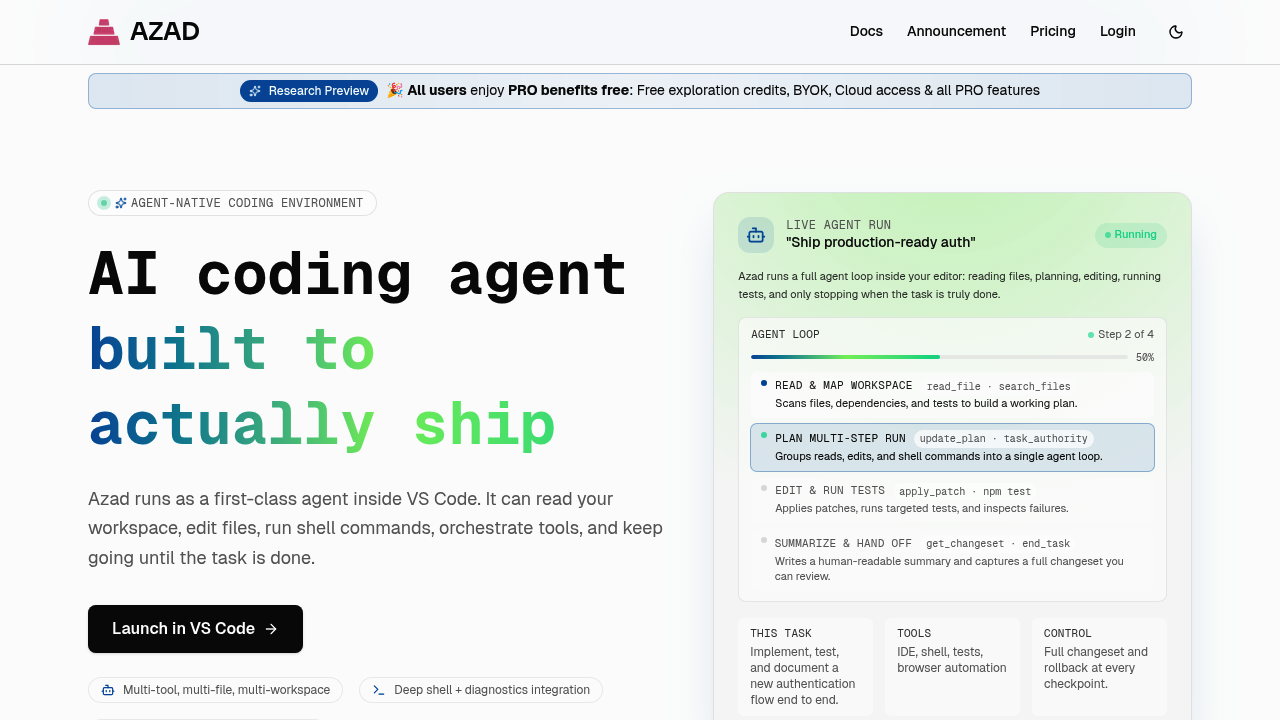
Azad is a VS Code extension and AI coding agent developed by Azad (formerly Kodu.ai, rebranded). Its core differentiator is an agent-native VS Code coding environment featuring multi-tool calls, task budgeting, remote monitoring, and Playwright browser automation — with all PRO features currently available free during Research Preview. As a Claude Code alternative, it is best suited for VS Code users who want a powerful, deeply integrated agentic coding experience with advanced context management and browser automation without leaving their editor.
Azad vs. Claude Code: Quick Comparison
| Feature | Azad | Claude Code |
|---|
| Type | VS Code extension (AI coding agent) | CLI coding agent |
| IDEs | VS Code only | Any terminal / IDE via CLI |
| Pricing | Research Preview — all PRO features free (BYOK) | Usage-based (Anthropic API) |
| Models | BYOK (provider not publicly documented) | Claude (Anthropic) |
| Privacy/Hosting | Cloud + BYOK | Cloud (Anthropic) |
| Open Source | No | No |
| Offline/Local Models | No | No |
Key Strengths
- Agent-Native VS Code Environment: Azad is purpose-built as a VS Code extension rather than a CLI tool layered onto an editor. This means the agent has native access to VS Code's file system, diagnostics, terminal, and extension APIs, enabling deeper integration than tools that operate through the terminal. Multi-tool calls allow the agent to simultaneously read files, run shell commands, and access browser contexts within a single task flow.
- Task Budgeting with Time, Turn, and Cost Limits: Azad introduces task budgeting controls that let developers set explicit limits on how long, how many turns, or how much an agent task can consume. This unique feature prevents runaway agent sessions from consuming unexpected API credits or time, giving developers precise control over agentic automation without requiring constant supervision.
- Remote Monitoring from Mobile: Azad supports remote connection, allowing developers to monitor ongoing agent tasks from a mobile device. This is a distinctive capability for an IDE extension: developers can initiate a long-running coding task, leave their desk, and check on the agent's progress remotely without being tethered to their workstation.
- Playwright Browser Automation Built-In: Azad includes built-in Playwright integration for browser automation tasks directly within the agent workflow. This enables use cases like end-to-end testing, web scraping as part of development tasks, or automated interaction with web apps — all orchestrated by the coding agent without requiring separate browser automation tooling.
- Advanced Context Management and MCP Integration: Azad features sophisticated context management that tracks multi-file edits, shell diagnostics, and web search results as part of a unified agent context. It also integrates with the Model Context Protocol (MCP), enabling extension through custom tools and external data sources that can be connected to the agent's decision-making pipeline.
Known Limitations
- VS Code Exclusive: Azad is currently only available as a VS Code extension. Developers using JetBrains IDEs, Vim, Emacs, or other editors cannot use Azad without switching to VS Code, which is a significant constraint for polyglot development environments.
- Research Preview — Uncertain Future Pricing: Azad's Research Preview offers all PRO features free, but future pricing has not been publicly documented. Developers who become reliant on Azad's feature set should be aware that commercial pricing will likely be introduced, and the cost structure is currently unknown.
- Model Transparency: Azad supports BYOK but does not publicly document which AI providers or models are supported through its cloud access. The lack of model transparency makes it harder to predict costs, compare capabilities, or plan for specific context window requirements.
Best For
Azad is best suited for VS Code power users who want the most deeply integrated agentic coding experience available within their editor. Developers building complex, multi-file features who need precise budget controls, browser automation, and remote monitoring will find Azad's feature set distinctive among VS Code AI extensions. It is particularly compelling during its Research Preview phase, where all PRO features are available at no cost — making it an excellent time to evaluate its capabilities against paid alternatives like Claude Code.
Pricing
- Research Preview: All PRO features free — includes BYOK, cloud access, and exploration credits
- Post-Preview Pricing: Not yet publicly documented
- Azad is currently in Research Preview, and future pricing has not been announced. Verify current pricing and availability at azad.bot before committing to the tool for production workflows.
Tech Details
- Type: VS Code extension (AI coding agent)
- IDE/Environment Support: VS Code exclusively
- Key Features: Multi-tool calls, multi-file write/edit, advanced context management, MCP integration, multi-workspace support, remote connection (mobile monitoring), task budgeting (time/turn/cost limits), Playwright browser automation, shell + diagnostics integration, web search and docs retrieval built-in
- Privacy/Hosting: Cloud-based + BYOK (Bring Your Own Key)
- Models: BYOK supported; cloud model access available (specific models not publicly documented)
- Offline Execution: No
- Open Source: No
- VS Code Marketplace: marketplace.visualstudio.com
When to Choose Azad Over Claude Code
- You work primarily in VS Code and want an AI coding agent that is natively integrated into the editor — with access to diagnostics, file system, and terminal — rather than a CLI tool that operates alongside your IDE.
- You need task budgeting controls to prevent runaway agent sessions from consuming excessive API credits or time, and want fine-grained control over how much autonomy the agent is given per task.
- Your development workflow includes browser automation, end-to-end testing, or web scraping that you want the coding agent to coordinate alongside code generation within the same session.
- You want to evaluate a full-featured agentic coding environment at no cost during the Research Preview period, before committing to any paid subscription.
- You need remote monitoring capability — the ability to start a long-running agent task and monitor its progress from a mobile device without staying at your desk.
When Claude Code May Be a Better Fit
- You work across multiple IDEs or editors and need a coding agent that operates universally through the terminal rather than being tied to a single editor ecosystem.
- You want a commercially stable, production-ready tool with clear, published pricing and long-term support — rather than a Research Preview product with uncertain future pricing.
- You prefer direct access to Anthropic's Claude models with full model transparency, context window documentation, and pricing clarity rather than a BYOK setup with undisclosed model details.
Conclusion
Azad (formerly Kodu.ai) brings a genuinely distinctive set of capabilities to the VS Code coding agent landscape: task budgeting, remote monitoring, built-in browser automation, and deep MCP integration set it apart from both CLI agents and simpler IDE copilots. During its Research Preview phase, Azad represents one of the highest-value propositions in the Claude Code alternative space — offering PRO features at no cost while delivering capabilities that exceed many paid tools. Developers willing to embrace a Research Preview product will find Azad among the most feature-complete VS Code coding agents available today.
Sources
FAQ
Is Azad free to use?
During the Research Preview phase, Azad offers all PRO features at no cost, including BYOK, cloud access, and exploration credits. Future pricing has not been publicly documented, so users should check azad.bot for current availability and pricing information.
What is the relationship between Azad and Kodu.ai?
Azad is the rebranded successor to Kodu.ai. The VS Code extension retains its marketplace identifier (kodu-ai.claude-dev-experimental) but the product and company have rebranded under the Azad name. Core functionality and development continue under the new brand.
Does Azad support models other than Claude?
Azad supports BYOK (Bring Your Own Key), allowing users to connect their own AI provider API keys. The specific providers and models supported through cloud access are not publicly documented. Users should verify current model support on the official Azad site or documentation.
What is task budgeting in Azad?
Task budgeting is a unique Azad feature that allows developers to set explicit limits on agent tasks — including maximum time, number of agent turns, and API cost. This prevents agents from running indefinitely or consuming unexpected credits, giving developers precise control over agentic automation without constant supervision.
Can Azad automate browser interactions?
Yes. Azad includes built-in Playwright integration that allows the agent to automate browser interactions as part of its coding workflow. This enables use cases like automated end-to-end testing, web scraping for development context, or interacting with web applications — all coordinated by the coding agent within the VS Code environment.
Does Azad work with IDEs other than VS Code?
No. Azad is currently exclusive to VS Code. Developers using JetBrains IDEs, Vim, Neovim, Emacs, or other editors will need to switch to VS Code or use a different Claude Code alternative that supports their preferred environment.