Tempo: A Claude Code Alternative for AI IDEs Workflows
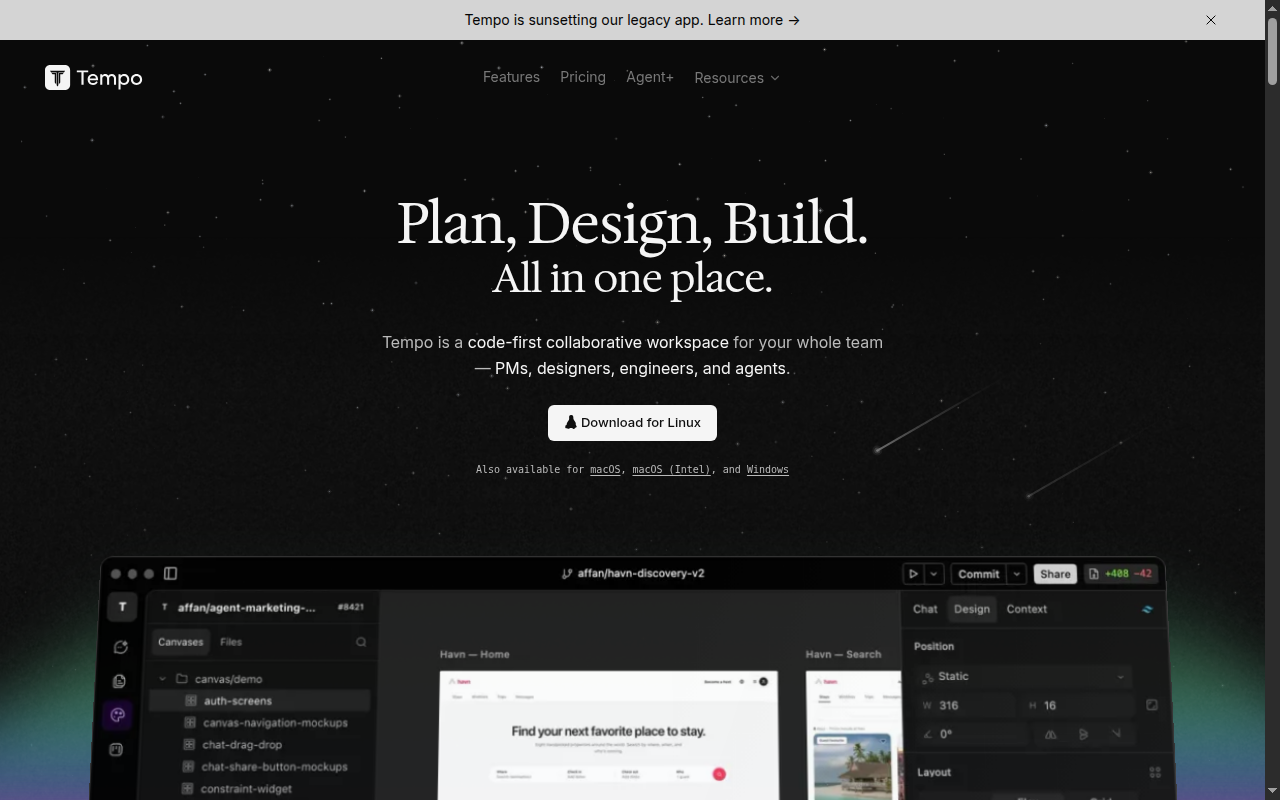
Tempo is a ai ide developed by Tempo Labs. It focuses on an AI-powered React workspace for prompting, editing, and collaborating on production UI work. As a Claude Code alternative, it fits teams that want AI-assisted coding plus visual product and design collaboration in one workspace.
Tempo vs. Claude Code: Quick Comparison
| Tempo | Claude Code |
|---|
| Type | AI IDE | CLI Agent |
| IDEs | Browser workspace focused on React; collaborative visual editor | Any editor via CLI / terminal |
| Pricing | Starter is free; Agent+ is $4,500/month. Other seat tiers are not fully documented in the fetched sources. | Usage-based via Anthropic ecosystem |
| Models | Not publicly documented | Anthropic Claude family |
| Privacy / hosting | Cloud workspace; self-hosting and on-prem options are not publicly documented | Runs against your repo and terminal workflow |
| Open source | No | No |
| Offline / local models | No | No |
Key Strengths
- Product and engineering stay in the same loop: Tempo positions itself as a shared workspace for PMs, designers, engineers, and agents instead of a solo terminal tool. That matters when the work is not only code generation, but also review, prioritization, and visual iteration. Claude Code is excellent for deep repo work, but it does not try to be a visual collaboration surface.
- React-focused visual editing: The product messaging and Product Hunt positioning both emphasize React workflows. That gives Tempo a concrete lane: teams can prompt code, adjust UI visually, and keep design changes closer to production components. For frontend-heavy teams, that can reduce the handoff friction that still exists with terminal-first agents.
- Higher-touch execution path with Agent+: Tempo does not only sell self-serve prompts. Its Agent+ offer adds a human-reviewed delivery layer with a promise of 1-3 features per day, which is a very different operating model from pure self-serve coding agents. That makes it interesting for teams that want outcomes and review, not just raw generation.
Known Limitations
- React specialization narrows the fit: The strongest public messaging around Tempo is React-specific. If your stack is backend-heavy, polyglot, or outside the modern React frontend lane, Claude Code remains more flexible because it operates on the repository you already own rather than a specific product workflow.
- Model transparency is limited: The fetched official pages do not clearly document model choices, context window sizes, or privacy controls in the way infrastructure-minded teams often expect. That makes procurement and risk review harder than tools that publish explicit model and data-handling documentation.
- Pricing transparency is partial: The live snippets clearly expose the free Starter tier and the high-end Agent+ service, but not a full public matrix for all tiers in the fetched evidence. That is enough to validate the product is commercial and active, but not enough to make a detailed seat-cost comparison without checking the current signup flow.
Best For
Tempo is best for frontend-heavy product teams that want a shared AI development surface rather than a solo coding assistant. It is especially relevant when designers, PMs, and engineers need to converge on React output quickly and care about visual editing as much as raw code generation. If your work tends to start from interface changes or collaborative iteration, Tempo has a clearer story than a terminal-native agent.
The strongest use case here is not simply 'AI coding' in the abstract. It is the workflow shape the product is explicitly built around: collaborative React delivery for Tempo, full-stack browser building for Emergent, or hosted no-code launch for Hostinger Horizons. That workflow fit is the main reason to pick one of these tools over Claude Code, not the generic claim that AI can generate code.
If your team primarily measures success by how quickly it can reach a working interface, demo, or hosted MVP, these products can move faster than a terminal-first agent. If your team measures success by codebase stewardship, repeatable engineering process, and precise low-level control, Claude Code still has structural advantages.
Another way to frame the decision is by asking where the project currently lives. If the project mostly exists as an idea, rough requirements, a Figma file, or a collection of product notes, a browser-based builder can compress the path from concept to testable app dramatically. If the project already exists as a mature repository with conventions, scripts, CI checks, and internal dependencies, a repo-native agent usually fits that environment more naturally.
That distinction matters because AI tools often look similar in marketing and very different in practice. A product that excels at first-draft generation may still struggle when you ask it to preserve architecture, respect internal patterns, or manage cross-cutting changes over time. The best teams adopt with that reality in mind and use the tool whose default workflow most closely matches the work they actually do every day.
Pricing
- Starter: $0/month; 100 AI messages/month; up to 10 team members; 250 kanban issues
- Agent+: $4,500/month; agents design and ship 1-3 features daily with human review
Prices are subject to change. Check the official pricing page for current details.
Tech Details
- Type: AI IDE
- IDEs: Browser workspace focused on React; collaborative visual editor
- Key features: Prompt-based React development, Visual editing and layout refinement, Collaboration for PMs, designers, engineers, and agents, Kanban and planning workflow, Agent+ service for higher-touch delivery, MCP App Store and GitLab support
- Privacy / hosting: Cloud workspace; self-hosting and on-prem options are not publicly documented
- Models / context window: Not publicly documented
When to Choose This Over Claude Code
- Choose Tempo when your bottleneck is not only coding, but also visual refinement and cross-functional collaboration around the UI.
- Choose Tempo when React output and product workflow coordination matter more than terminal-native autonomy.
- Choose Tempo when you want a workspace that keeps planning, design edits, and code iteration close together instead of split across multiple tools.
A good rule of thumb is simple. If the product reduces the number of tools, handoffs, or setup steps that happen before the first working version appears, it is probably playing to its strengths. That is especially true for teams validating ideas, building customer-facing prototypes, or working with non-engineering stakeholders who need a live artifact quickly.
These tools also make more sense when the output can be opinionated. Claude Code shines when the repository is already real and the engineering constraints are already known. App builders and visual workspaces shine when the constraints are still fluid and the fastest path is to get something visible, interactive, and editable in a shared environment.
They can also be a better fit when stakeholder alignment is part of the bottleneck. A PM or founder can react to a deployed preview much faster than to a diff or terminal transcript. That feedback loop can be strategically valuable even when the generated app is not yet production-grade, because it helps the team decide what deserves deeper engineering investment before spending weeks in a traditional build cycle.
When Claude Code May Be a Better Fit
- Claude Code is a better fit for deep multi-file refactors in an existing repository where terminal access, scripts, and precise codebase control matter most.
- Claude Code is stronger when you need broad language or framework flexibility instead of a React-centered workflow.
- Claude Code is easier to justify when your team already has established Git, IDE, and review processes and only needs an autonomous coding agent.
Claude Code becomes more attractive as software complexity rises. Multi-service refactors, migration work, infrastructure changes, deep debugging, and large repository reasoning all benefit from the directness of a terminal-native agent. That does not make the alternatives weak; it simply means they are optimized for a different center of gravity.
The more your success depends on deterministic file changes, repeatable scripts, internal tooling, and exact control over what happens in the codebase, the more likely Claude Code remains the safer default. The more your success depends on speed to a usable product surface, the more likely a builder or visual workspace wins.
There is also an ownership question. Claude Code usually works within code and infrastructure you already control. Builder-style products can offer faster onboarding, but they introduce questions around portability, limits, pricing mechanics, and how cleanly the output transfers when the project grows beyond the happy path.
Those trade-offs are manageable, but they should be understood before a team standardizes on any single platform.
Conclusion
Tempo is a credible fit for teams that want AI-assisted React development with built-in collaboration and visual control. It is not the broadest replacement for Claude Code, but it is one of the more differentiated options when the job is shipping UI-heavy product work with multiple stakeholders in the loop.
The key decision is not whether one tool is universally smarter than another. It is whether your current workflow is blocked by engineering depth or by product assembly speed. If your pain is shipping the first useful version, these alternatives are worth serious consideration.
If your pain is evolving a serious codebase safely, Claude Code still carries a stronger default position.
A practical rollout strategy is to treat these tools as workflow accelerators first and systems of record second. Use them to validate ideas, assemble initial interfaces, or unblock feature exploration, then evaluate how well the output stands up once the application needs versioning discipline, regression control, and maintainable long-term ownership. Teams that make that distinction early tend to get more value and less disappointment from AI development products.
Sources
FAQ
Is Tempo free?
Yes, Tempo exposes a free Starter plan with 100 AI messages per month, support for up to 10 team members, and 250 kanban issues in the fetched official snippet.
Does Tempo work with VS Code?
The fetched official positioning centers on Tempo's own browser workspace and visual editor. Native VS Code support is not publicly documented in the sources used for this listing.
How does Tempo compare to Claude Code?
Tempo is more visual and more collaborative. Claude Code is stronger for terminal-native repo work, while Tempo is more compelling when product, design, and engineering want to work in one React-focused loop.
What kind of stack is Tempo best suited for?
Based on the official positioning and Product Hunt listing, Tempo is best suited for React-centric frontend and product workflows rather than general-purpose backend-heavy engineering.