Conductor: A Claude Code Alternative for Parallel Multi-Agent Coding Orchestration
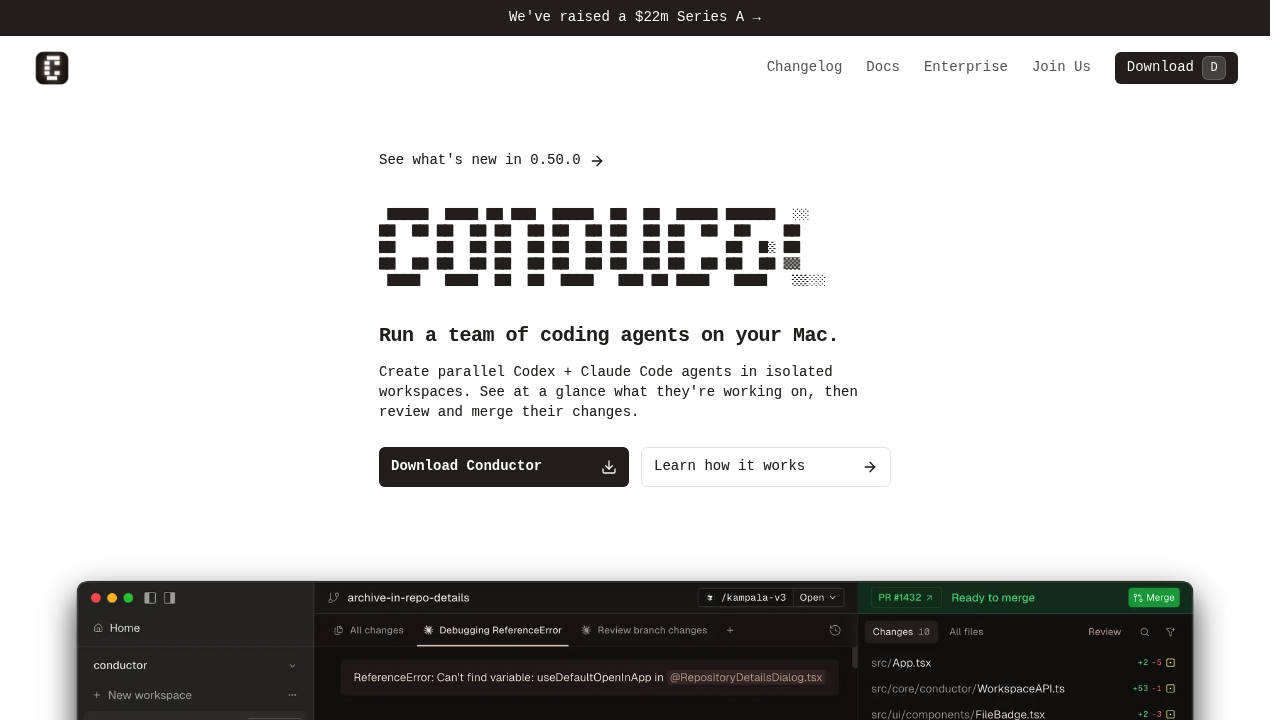
Conductor is a macOS-native application for orchestrating multiple AI coding agents in parallel, built by Melty Labs (backed by a $22M Series A). Rather than replacing Claude Code, Conductor multiplies it — enabling developers to run multiple Claude Code and OpenAI Codex agents simultaneously in isolated git worktrees, review their outputs from a unified interface, and merge changes back to the main branch with clear oversight. For developers who have experienced the single-threaded bottleneck of traditional agentic coding tools, Conductor offers a fundamentally different paradigm: run a team of AI agents, not just one.
Each Conductor workspace is an isolated git worktree on your Mac. When you deploy an agent, Conductor clones your repository and gives each Claude Code or Codex agent its own branch, preventing conflicts between parallel workflows. A unified review interface shows all agent activity at a glance — what each agent is working on, what needs attention, and what's ready to merge. You review and merge changes just as you would with a human development team, except the team works in parallel at AI speed.
Conductor uses your existing Claude Code or Codex authentication — whether that's an API key, Claude Pro, or Claude Max plan. There's no additional AI cost or new subscription for the models themselves. The application works entirely on your Mac; repositories are cloned locally, and agent work happens on your machine. This local-first design preserves privacy and eliminates cloud dependencies beyond the AI model providers themselves.
Conductor vs Claude Code: Feature Comparison
| Feature |
Conductor |
Claude Code |
| Parallel agents |
Yes (multiple Claude Code + Codex agents simultaneously) |
No (single agent per session) |
| Isolated git worktrees |
Yes (one per workspace automatically) |
Manual setup required |
| Unified review interface |
Yes (visual overview of all agent work) |
No |
| Agent backends supported |
Claude Code + OpenAI Codex |
Claude models only |
| Works locally on Mac |
Yes (repo cloned locally, runs on your Mac) |
Yes (CLI) |
| macOS native app |
Yes |
No (CLI only) |
| Uses existing Claude auth |
Yes (API key, Pro, or Max plan) |
Yes |
| Branch rename automation |
Yes |
No |
| Cross-platform |
macOS only |
macOS, Linux, Windows |
| Independent code generation |
No (orchestrates Claude Code/Codex) |
Yes |
Key Strengths of Conductor
- True parallel agent execution with worktree isolation: Conductor's core value is enabling multiple AI agents to work simultaneously without stepping on each other. Each workspace gets its own git worktree, so agents can modify files, run tests, and commit changes independently without conflicts. A developer can have one agent refactoring the authentication module while another builds a new API endpoint — and both branches merge cleanly.
- Unified visual review interface: Rather than tracking multiple terminal sessions or checking different branches manually, Conductor presents all agent activity in a single macOS interface. You can see at a glance which agents are busy, which have completed work, and which need attention. The review and merge workflow is integrated into the same interface, reducing context switching dramatically.
- Uses existing Claude Code and Codex subscriptions: Conductor doesn't create a new AI cost center. It uses whatever Claude Code authentication you already have — API key, Claude Pro subscription, or Claude Max plan. For teams that have already invested in Claude Code at scale, Conductor adds parallelism without adding model costs. The same applies to Codex through your OpenAI account.
- Local-first privacy architecture: Conductor works entirely on your Mac. Repositories are cloned locally, and all agent work happens on your machine. The only external communication is with Claude or Codex model APIs, which is identical to running Claude Code or Codex directly. Teams with code confidentiality requirements benefit from the absence of a Conductor cloud intermediary.
- Trusted by builders at major tech companies: Conductor is used by engineers at Notion, Vercel, Life360, Ramp, and Spotify — a strong signal of reliability for developer tooling at professional scale. User testimonials consistently describe it as a "productivity unlock" and highlight the paradigm shift from sequential to parallel AI-assisted development.
Known Limitations
- macOS only — no Linux or Windows support: Conductor is exclusively a macOS application. Developers on Linux or Windows have no access to Conductor, which limits adoption in organizations with diverse operating system policies. Cross-platform support is not currently announced.
- Requires existing Claude Code or Codex subscription: Conductor is an orchestration layer, not an AI provider. Without a Claude Code subscription (API key or Claude Pro/Max) or an OpenAI Codex account, Conductor has no model to run. The tool adds value for users already paying for these services, but doesn't reduce the underlying AI model cost.
- Not a standalone coding agent: Conductor cannot generate, modify, or reason about code on its own. It's an orchestrator for Claude Code and Codex. If neither of those tools is appropriate for a given task, Conductor doesn't help. Teams that want to use other AI models (Gemini, Llama, Mistral) cannot do so through Conductor currently.
- Pricing not publicly documented: Conductor's pricing is not publicly listed on its website, which creates uncertainty for budget planning. The application appears to be downloadable with a free tier, but full pricing transparency would help teams evaluate ROI before adoption.
Best For
Conductor is best for individual developers and small engineering teams who use Claude Code or Codex heavily and are ready to go parallel. The tool shines for developers working on projects with multiple independent workstreams — feature development, bug fixes, refactoring, and testing — that can be run in parallel without stepping on each other. Mac-native development teams at startups and scale-ups, particularly those at companies like the ones listed in Conductor's testimonials (Notion, Vercel, Life360), are the natural fit.
Developers who have experienced the frustration of waiting for a single Claude Code agent to finish one task before starting another will find Conductor's parallel execution model immediately valuable. Engineering leads who want to assign multiple agent workstreams to different feature areas simultaneously will also benefit from the unified review interface.
Pricing
Conductor's pricing is not publicly documented on the website at the time of this writing. A free tier appears to be available based on the download flow. For the latest pricing information, visit the Conductor website or contact the team directly.
Note: AI model costs (Claude Code, Codex) are not included in Conductor's pricing — Conductor uses your existing subscriptions and API access for those models.
Tech Details
- Platform: macOS only (native app)
- Agent Backends: Claude Code (Claude Sonnet, Claude Pro/Max), OpenAI Codex
- Workspace Isolation: Git worktrees (one per workspace, automatically managed)
- Local Architecture: Runs entirely on your Mac; repos cloned locally
- Authentication: Uses your existing Claude Code (API key/Pro/Max) and Codex (API key) authentication
- Review Interface: Native macOS UI with unified agent activity view
- Branch Management: Automated branch naming and rename capabilities
- Agent Steering: Follow-up behavior configuration per agent
- Open Source: No (documentation repository at GitHub)
When to Choose Conductor Over Claude Code
Choose Conductor when you're already using Claude Code and want to multiply your output by running multiple agents in parallel. If you find yourself sequentially queuing tasks for a single Claude Code session — waiting for one feature to complete before starting another — Conductor's parallel worktree model directly eliminates that bottleneck. The unified review interface adds value when you want to maintain visibility and control over multiple parallel workstreams without context-switching between terminal sessions.
Conductor is also the right choice when working with teams that benefit from clear separation of concerns: one agent handles the API layer, another handles the UI, a third handles tests — all running simultaneously and merging cleanly.
When Claude Code May Be a Better Fit
Claude Code remains the better choice for developers who don't use macOS, don't already have Claude Code or Codex subscriptions, or need a standalone AI coding assistant rather than an orchestration layer. For complex, deeply interconnected tasks that require a single agent to reason holistically across many files simultaneously, Claude Code's focused approach may outperform parallel agents working independently. Single-developer projects with simple feature workflows also don't need Conductor's parallelism overhead.
Conclusion
Conductor represents the next evolution in AI-assisted development: moving from single-agent to multi-agent workflows. By leveraging git worktrees, isolated workspaces, and a polished macOS review interface, Conductor enables developers to run a coordinated team of AI agents at AI speed — without the conflict, confusion, or coordination overhead that would accompany a human team of the same size. For Mac developers who are already comfortable with Claude Code or Codex and ready to go parallel, Conductor is the multiplier that takes AI-assisted development to a new level of productivity.
Sources
Frequently Asked Questions
Do I need to buy a separate Claude Code subscription to use Conductor?
Yes. Conductor orchestrates Claude Code and Codex agents but does not provide AI model access itself. You need an existing Claude Code subscription (via API key, Claude Pro, or Claude Max plan) or OpenAI Codex access. Conductor uses your existing authentication; it doesn't add new model costs on top of what you're already paying.
What are git worktrees and why does Conductor use them?
Git worktrees allow multiple working directories from the same repository, each on a different branch. Conductor creates one worktree per workspace, so each AI agent works on its own branch without interfering with other agents. When an agent completes its work, you review the changes and merge them through Conductor's interface — just like a PR review process.
Is Conductor available on Windows or Linux?
No. Conductor is currently macOS-only. There is no Windows or Linux version available at this time. Cross-platform support has not been officially announced.
Can I use AI models other than Claude Code and Codex with Conductor?
Currently, Conductor supports Claude Code (Claude models) and OpenAI Codex as agent backends. Other AI models (Gemini, Llama, Mistral, etc.) are not supported. The team accepts requests for additional agent backend integrations via email.