Canopy: A Claude Code Alternative for Parallel Multi-Branch Agent Workflows
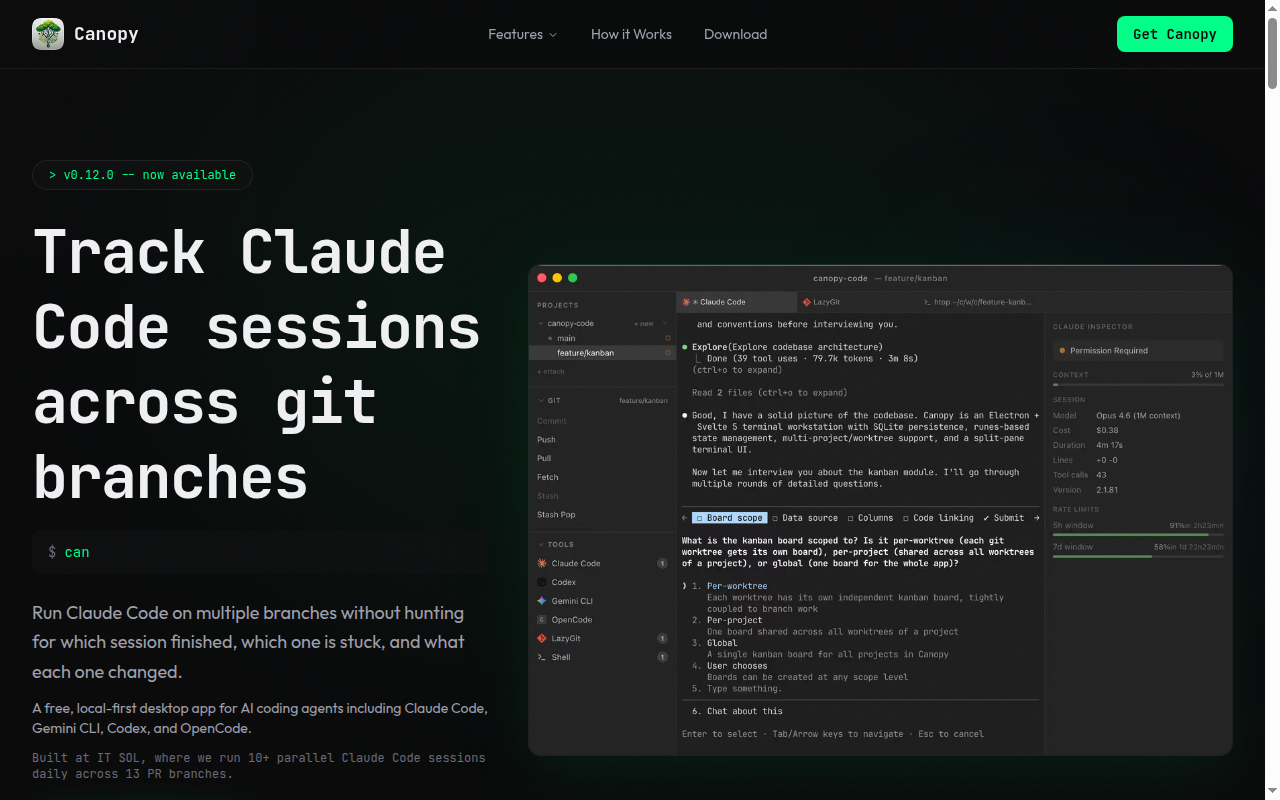
Canopy is a desktop developer workstation from IT SOL for running AI coding agents across multiple git worktrees at once. It combines terminals, session inspection, branch management, browser tabs, and agent launchers in a single local-first window. As a Claude Code alternative, it is best suited for developers who run several parallel agent sessions and need stronger visibility across branches than a plain terminal setup provides.
Canopy vs. Claude Code: Quick Comparison
| Canopy | Claude Code |
|---|
| Type | AI IDE / agent workspace | CLI Agent |
| IDEs | Standalone desktop workstation for macOS, Windows, and Linux | Any editor via CLI / terminal |
| Pricing | Free, source-available, no account required | Usage-based via Anthropic API; ~$3–15/MTok |
| Models | Works with Claude Code, Gemini CLI, Codex, and OpenCode | Claude 3.5 / Claude 3 Opus |
| Privacy / hosting | Local-first desktop app; does not upload project files | Cloud (Anthropic API) |
| Open source | Source-available | No |
| Offline / local models | Partial; runs local desktop workflow but connected agent backends depend on chosen tools | No |
Key Strengths
- Purpose-built for parallel sessions: Canopy is explicitly designed for developers who run AI coding agents across many git worktrees in parallel. Its sidebar, inspector, and per-worktree session model solve a real workflow problem that raw terminals do not solve well once you have several active branches. This makes it more operationally useful than a simple wrapper around one agent process.
- Multi-agent compatibility: The official site and repository both say Canopy can launch Claude Code, Gemini CLI, Codex, and OpenCode. That means the product is not locked to one agent brand, even though Claude Code is the most visible use case in its messaging. Teams that compare models or route different tasks to different tools can keep that behavior inside one workstation.
- High-observability developer workflow: Canopy includes an inspector for session cost, tokens, context usage, tool calls, and task state. It also combines terminals, git worktree management, browser tabs, and diff review in one UI. For developers who spend a lot of time coordinating agent work rather than merely starting it, that visibility is a meaningful advantage.
Known Limitations
- It is a workspace, not the agent itself: Canopy does not replace the underlying agent runtimes in the way a standalone model provider or coding engine does. It manages and visualizes tools such as Claude Code, Codex, and Gemini CLI, so its value depends on whether orchestration and visibility are your actual bottleneck. If you only work in one branch from one terminal, the official site itself says you probably do not need it.
- Source-available is not the same as permissive open source: The repository states that the project uses the Canopy Source-Available License v1.0. It is free to use for any purpose according to the public materials, but teams with strict open-source policy requirements should still review the license text rather than assume MIT or Apache terms.
Best For
Canopy is best for developers who already work with coding agents at high volume and feel the pain of context switching between branches, terminals, and inspection points. It is especially well suited to teams that keep many pull request environments alive at the same time.
It also fits people who want a GUI without giving up their preferred AI agents. Instead of forcing a switch to one editor or one provider, it sits above several agent tools and organizes their work in one place.
Pricing
- Desktop app: Free to use, source-available, and no account required.
- Subscription: Not required according to the official site and repository.
- Agent costs: Your underlying Claude Code, Codex, Gemini CLI, or other provider costs still apply because Canopy uses your own keys and licenses.
Prices are subject to change. Check the official site and latest release page for current details.
Tech Details
- Type: AI IDE / agent workspace
- IDEs: Standalone desktop workstation with integrated terminals, browser tabs, and worktree views
- Key features: git worktree manager, session inspector, terminal panes, browser per worktree, diff review, GitHub integration, Jira and YouTrack integration, command launcher, auto-updates
- Privacy / hosting: Local-first desktop app that says project files stay on your machine; prompts pass through to the underlying AI providers
- Models / context window: Claude Code, Gemini CLI, Codex, and OpenCode support are documented; exact context-window matrix depends on the selected underlying agent and is Not publicly documented by Canopy as one unified table
Workflow Fit in Practice
Canopy solves a different problem than a pure coding agent. It is not trying to be the best model or the smartest autonomous planner. It is trying to be the place where multiple agent sessions become manageable when they are spread across many worktrees, terminals, and test environments.
That framing matters because many developers underestimate the coordination cost of serious agent usage. Running three to ten sessions at once creates overhead around token visibility, branch ownership, browser state, staging credentials, and simple awareness of which session is idle, blocked, or finished.
The official site is unusually direct about this. If you are working on one branch in one terminal, Canopy admits it may add overhead you do not need. That is a healthy sign because it narrows the product to a concrete high-intensity workflow instead of pretending it is the universal answer for all developers.
Operational Considerations
Canopy's local-first model is important for privacy-sensitive teams, but it does not remove the need to govern underlying agent usage. Prompts still go from your machine to the actual provider you choose, and your spend still depends on the connected tools. The app improves visibility into that spend, but it does not replace provider policy.
The source-available positioning is another practical consideration. For many teams, free use plus visible code is enough. For others, the difference between source-available and a standard open-source license is material for procurement, internal redistribution, or commercial embedding decisions.
Finally, Canopy is strongest when your workflow already includes worktrees, issue trackers, and repeated context switching. If your team does not use that style of development, some of the product's biggest advantages will remain theoretical.
Feature Depth
The public materials describe much more than a terminal launcher. Canopy includes a real-time inspector for cost and token tracking, tool activity, context usage, and session state. It also adds browser tabs per worktree, built-in diff review, GitHub pull request and CI integration, Jira and YouTrack task linking, command launching, and auto-updates.
On the infrastructure side, the repository mentions Electron, Svelte, xterm.js, tmux, SQLite, and simple-git. That stack fits the product's role as a desktop workstation rather than a browser-only dashboard. The app appears optimized for developers who want persistent local state and heavy desktop interaction.
The official feature list also shows that Canopy is designed to work as a GUI for multiple agent tools rather than to replace them. That is why the best way to evaluate it is not by asking whether its raw intelligence beats another agent, but by asking whether your team loses time on orchestration and supervision today.
When to Choose This Over Claude Code
- Choose Canopy if your real bottleneck is coordinating several agent sessions across multiple git branches rather than generating one response in one terminal.
- Choose it if you want one desktop layer for Claude Code, Codex, Gemini CLI, and OpenCode instead of treating each tool as a separate workspace.
- Choose it if cost visibility, worktree isolation, integrated browser context, and diff review matter as much as the model output itself.
When Claude Code May Be a Better Fit
- Claude Code may be a better fit if you prefer a simpler direct CLI experience and only run one or two sessions at a time.
- Claude Code may also be better if you do not want another desktop layer between you and the underlying agent process.
- For teams with strict open-source policy requirements, Claude Code's commercial status may ironically be simpler to evaluate than a custom source-available license.
Conclusion
Canopy is a legitimate option for developers who use coding agents heavily enough that session management becomes its own problem. Its real value is not in replacing model providers but in turning parallel agent work into something visible and operable.
That makes it more specialized than many alternatives, but also more honest about the workflow it serves. If multi-branch agent orchestration is part of your daily reality, Canopy deserves attention.
If your workflow is smaller or more linear, a plain CLI may still be the better tool. The product is strongest when branch count, session count, and context-switching cost are already high.
Sources
FAQ
Is Canopy free?
Yes. The official site and repository both describe it as free to use and source-available, with no account required. You still pay whatever underlying agent or model costs apply to the tools you connect.
Does Canopy replace Claude Code itself?
No. Canopy is a workstation around agent tools such as Claude Code, Codex, Gemini CLI, and OpenCode. It improves management, visibility, and multi-branch operation rather than replacing the underlying agent engines.
Who should use Canopy?
It is best for developers and teams who already run several agent sessions across many worktrees. If you usually work in one branch and one terminal, the official site suggests you may not need the extra layer.
How does Canopy handle privacy?
The official site says project files stay on your machine and that Canopy does not upload them to its own server. Prompts pass through to the underlying providers you choose, and telemetry is described as minimal and optional.