DhiWise
AI-powered platform that converts Figma designs and text prompts into production-ready web and mobile applications.
DhiWise - Claude code alternative
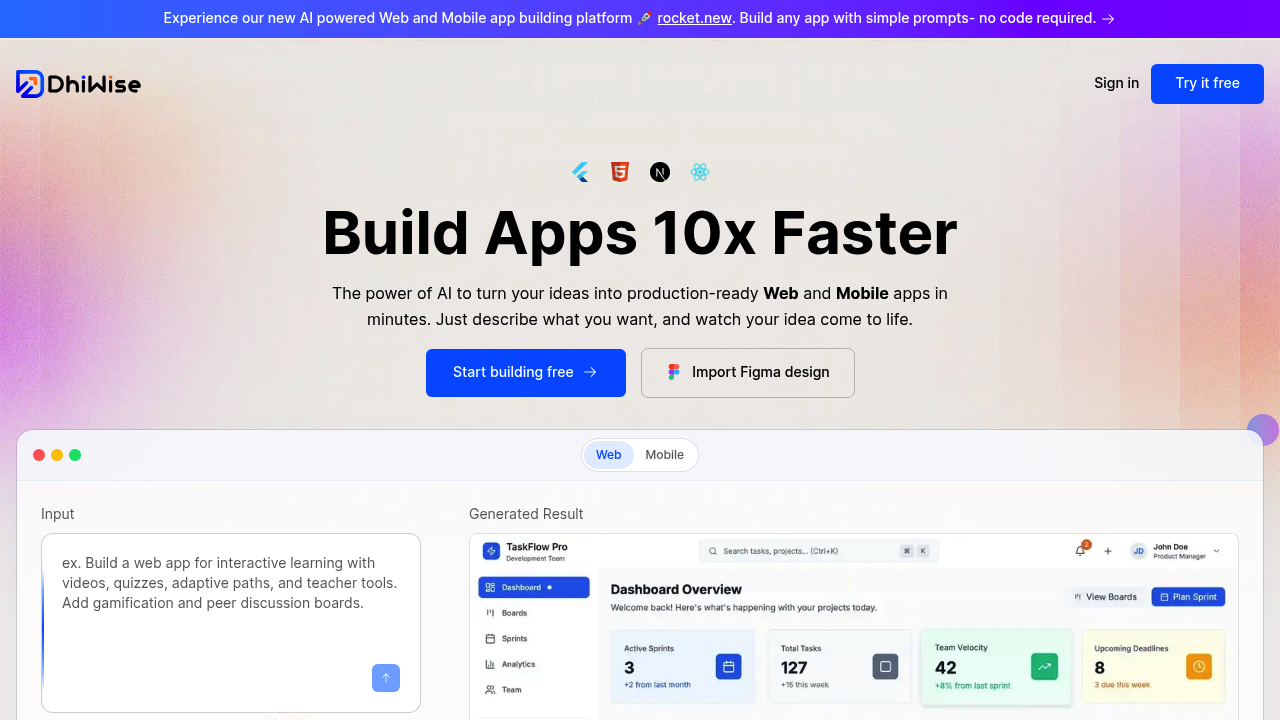
DhiWise transforms ideas into production-ready web and mobile apps by converting design files or text descriptions into clean code. The platform automates the application development lifecycle and generates readable, modular code for React and Flutter applications. Solo developers benefit from generating pixel-perfect responsive designs with modern semantic code output and clean maintainable structure. Unlike terminal-based coding assistants, DhiWise operates as a web-based Claude code alternative with browser-first workflows and visual design integration.
Strengths
- Converts Figma designs directly into production-ready code with proper component structure and industry-standard best practices. Design handoff becomes automated rather than manual.
- WiseGPT VS Code extension analyzes entire codebase to generate personalized, production-grade code matching existing coding style. Context awareness spans full projects, not isolated snippets.
- Supports multiple technology stacks including React.js, Next.js, HTML, Flutter, Kotlin, and Swift. Developers choose preferred frameworks without platform lock-in.
- IDE extension offers real-time code fetching that imports latest code directly into VSCode, IntelliJ, or Android Studio. Seamless sync between platform and local environment.
- Includes integrations with Supabase, Netlify, and Google Analytics. Backend services and deployment connect without manual configuration.
- Task To Code feature generates functional code directly from Jira, Trello, Asana, or ClickUp task details. Project management tools bridge into development automatically.
Weaknesses
- Web-based workflow requires uploading designs or using browser interface. No native terminal experience like Claude Code.
- Starts at $149.0 with pricing information scattered across sources. Cost structure unclear compared to transparent subscription models.
- Primarily design-to-code focused rather than general-purpose coding assistant. Less suitable for algorithm work or non-UI tasks.
- Local code analysis requires permission grant. Privacy model differs from fully local tools.
- Documentation suggests learning curve for platform-specific workflows. Initial setup more complex than opening a terminal.
Best for
Frontend and mobile developers who work with Figma designs regularly. Teams converting UI mockups into applications with minimal manual coding. Solo developers building full-stack apps who prioritize visual design accuracy and rapid prototyping over terminal-based workflows.
Pricing plans
- Free Plan — Unknown — Free plan available, specific limits unknown.
- Paid Plan — Starts at $149.0 — Token limits, seats, and rate limits unknown.
- Custom Plan — Unknown — Custom plan available, details unknown.
Tech details
- Type: Web-based AI code generation platform with design-to-code capabilities
- IDEs: VSCode, IntelliJ, Android Studio via extension; WiseGPT Visual Studio Code extension available
- Key features: Figma-to-code conversion, pixel-perfect responsive design, modern semantic code output, clean maintainable structure; Task-to-code from project management tools, code autocompletion, custom and pre-defined commands, chat-based assistance
- Privacy / hosting: Cloud-based platform; code analysis occurs locally within development environment, code not stored by platform. Not self-hosted.
- Models / context window: Specific AI models not disclosed. WiseGPT analyzes entire codebase for context, approximate context window unknown.
When to choose this over Claude code
- Your workflow centers on converting Figma or design files into applications. DhiWise specializes in pixel-accurate design translation that Claude Code handles less directly.
- You need full-stack app scaffolding with backend integration included. Platform supports Supabase, Netlify, and analytics integrations out of the box.
- You prefer browser-based development with visual interfaces. No terminal required for core workflows unlike Claude Code's command-line nature.
When Claude code may be a better fit
- You work primarily in terminal environments and prefer command-line tooling. Claude Code integrates natively with shell workflows while DhiWise operates browser-first.
- Your projects involve algorithm development, data processing, or backend-heavy work without UI components. Claude Code handles general programming better than design-focused platforms.
- You need transparent, predictable costs. Claude Code pricing is clearer than DhiWise's scattered pricing information across multiple sources.
Conclusion
DhiWise positions itself as a visual-first Claude code alternative targeting developers who translate designs into applications. The platform claims to build apps 10x faster by converting ideas into production-ready code in minutes. Strength lies in Figma integration and multi-framework support across mobile and web stacks. Developers committed to design-to-code workflows find value; those seeking terminal-based general programming assistants may prefer alternatives. The platform reports 158.3K+ users and 203.32K+ applications built, indicating adoption among design-centric development teams.
Sources
- Official site: https://www.dhiwise.com/
- Docs: https://docs.dhiwise.com
FAQ
What is DhiWise and how does it work as a Claude code alternative?
DhiWise is an AI-powered platform that converts design files or text descriptions into production-ready web and mobile applications. Unlike Claude Code's terminal-based approach, DhiWise operates through a web interface where developers upload Figma designs or describe requirements. The platform automates the development lifecycle and generates readable, modular code for React and Flutter apps. It functions as a Claude code alternative by providing AI-driven code generation, though with emphasis on visual design conversion rather than general terminal workflows.
Which programming languages and frameworks does DhiWise support?
DhiWise supports React.js, Next.js, HTML, Flutter, Kotlin, and Swift for frontend and mobile development. For backend support, the platform offers Node.js, with Laravel available for browser-friendly web applications. The Node.js builder integrates with MongoDB, SQL, PostgreSQL, and other databases. This multi-stack support allows developers to choose technology based on project requirements rather than platform constraints.
Can DhiWise integrate with existing development workflows and tools?
Yes. The IDE extension enables real-time code fetching directly into VSCode, IntelliJ, or Android Studio. WiseGPT generates code from task details imported from Jira, Trello, Asana, or ClickUp, bridging project management into development. The platform includes GitHub and GitLab integration for code sharing and version control. Cloud service integrations include Supabase, Netlify, and Google Analytics for deployment and monitoring.
How does DhiWise handle code privacy and security?
Code analysis occurs locally within your development environment to ensure confidentiality and security. The platform does not store your code or access sensitive information. All learning processes for style replication happen locally. DhiWise provides enterprise-grade security by default for both paying customers and free users. This local-first approach differs from cloud-based code storage models used by some competitors.
What are the main differences between DhiWise and Claude Code?
DhiWise operates as a web-based platform focused on design-to-code conversion, while Claude Code functions as a terminal-based coding assistant. DhiWise converts Figma designs into production-ready applications with pixel-perfect responsive output, making it design-centric. Claude Code excels at general programming tasks through command-line interaction. DhiWise's WiseGPT analyzes entire codebases for personalized code generation, but requires browser workflow. Choose DhiWise for UI-heavy projects with design files; choose Claude Code for terminal-native general development.
Is DhiWise suitable for solo developers or small teams?
Yes, particularly for developers converting designs into applications. The platform claims to build apps 10x faster by automating design-to-code conversion. A free plan is available, reducing entry barriers for solo developers. Features like Task To Code and IDE sync streamline individual workflows. However, paid plans start at $149.0, which may impact budget-conscious solo developers. The platform suits those prioritizing rapid prototyping and design accuracy over terminal-based flexibility.