AI App Generator | UI Bakery
Generate production-ready internal tools and data-driven web apps from natural language prompts using low-code visual development.
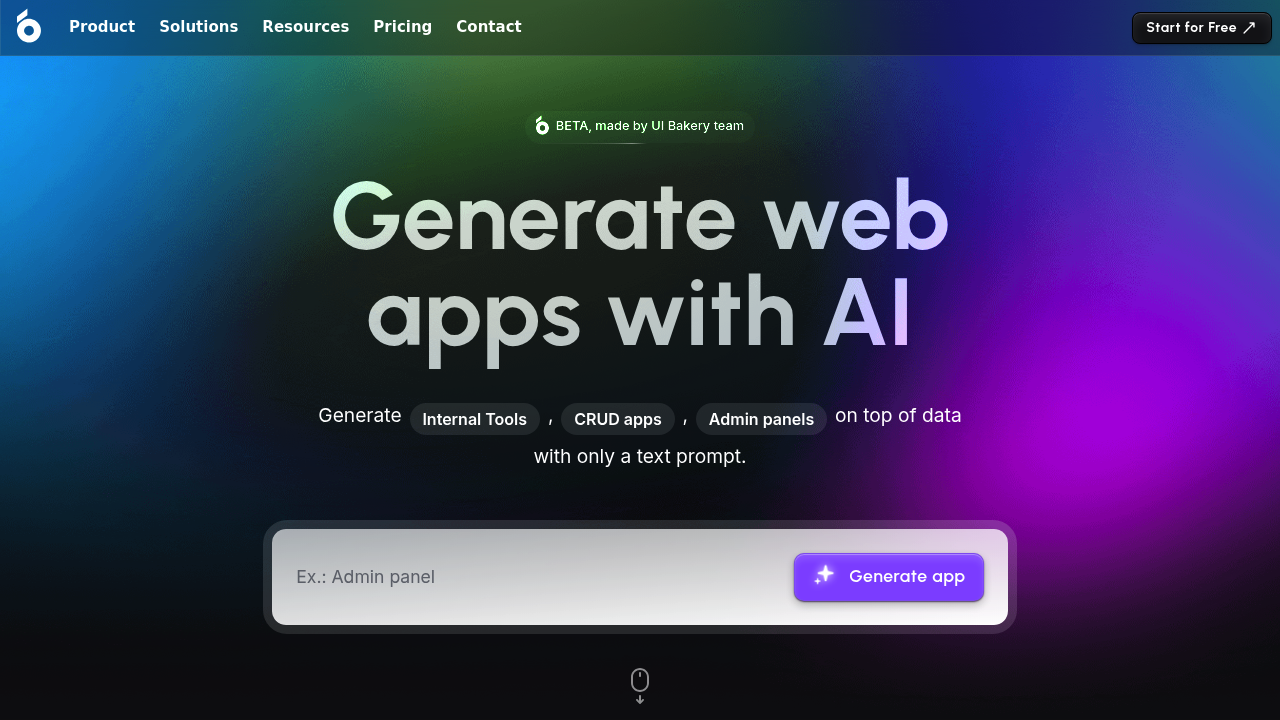
UI Bakery AI App Generator - Claude code alternative
UI Bakery AI App Generator is an AI-driven, low-code platform that generates functional, data-driven web applications within seconds using natural language prompts. Users describe their desired app features in text, and the platform generates working prototypes that can be edited visually and shared with teams. Unlike command-line coding assistants, this Claude code alternative emphasizes visual development, team collaboration, and enterprise-ready deployment options. Solo developers prefer it for building internal tools, CRUD applications, and admin panels without wrestling with frontend frameworks or deployment infrastructure.
Strengths
- Drag-and-drop UI builder with 75+ pre-built components eliminates need to learn CSS and JavaScript frameworks.
- Built-in AI datasource with streaming responses, plus native support for text generation, summarization, classification, and data extraction operations.
- Git integration enables branching, concurrent development, and synchronization between different UI Bakery instances for team workflows.
- Flexible pricing model with per-user and per-developer options; shared permission groups allow unlimited end-users at fixed cost for groups over 25 people.
- On-premise deployment via Docker containers with air-gapped setup meets compliance standards like HIPAA, SOC2, and PCI.
- GPT-based smart assistant trained on UI Bakery documentation helps with debugging, code generation in SQL, JavaScript, and Python.
Weaknesses
- Platform has a learning curve despite being low-code; new users need time to familiarize with all features and capabilities.
- As a cloud-based platform, consistent internet access is required for uninterrupted development workflow.
- Integration support may have limitations when connecting with less common or legacy systems.
- Visual-first approach may feel restrictive to developers accustomed to full code control and custom component libraries.
Best for
Operations teams, internal tool builders, and solo developers who prioritize speed over raw code flexibility when developing dashboards, admin panels, and data management applications.
Pricing plans
- Free — $0/month per user, $0/month per developer — Full feature access for small projects and prototyping.
- Standard (Monthly) — $5/month per user, $10/month per developer — For growing teams and iterative projects; billed monthly.
- Standard (Annual) — $6/month per user, $12/month per developer — Same features as monthly; discounted annual commitment.
- Business (Monthly) — $10/month per user, $40/month per developer — Advanced features for larger organizations; billed monthly.
- Business (Annual) — $12/month per user, $50/month per developer — Advanced tier with annual discount; includes shared permission groups.
- Enterprise — Custom pricing — Contact sales for volume licensing, dedicated support, and custom compliance requirements.
Tech details
- Type: Low-code platform with AI-driven app generation and visual development interface.
- IDEs: Web-based visual builder; no traditional IDE integration. Native Git sync for version control workflows.
- Key features: Drag-and-drop UI builder, conversational search using natural language, AI App Generator for prompt-to-app conversion, CRUD operations, workflow automation, GitHub/Git integration, custom JavaScript/Python code execution, and 75+ UI components.
- Privacy / hosting: Cloud version hosted on Azure SOC 1 and SOC 2 compliant servers with regular backups; on-premise version runs as Docker containers with zero data access by UI Bakery. Self-hosted deployment ensures air-gapped operation with no analytics collection. Data retention: Unknown (consult documentation for specifics).
- Models / context window: Uses hosted GPT-based AI datasource with streaming capabilities; option to replace with custom LLM solution. Context window size: Unknown.
When to choose this over Claude code
- Visual-first development preferred: Drag-and-drop interface and real-time preview eliminate manual UI coding and framework setup complexity.
- Internal tools and dashboards: Purpose-built for rapid CRUD apps, admin panels, and data visualization without boilerplate code.
- Team collaboration essential: Built-in Git branching, permission management, and shared deployment streamline multi-developer workflows.
When Claude code may be a better fit
- Full code ownership required: Claude code generates standalone source files you control completely; UI Bakery operates within its platform ecosystem.
- Custom architecture needed: When projects demand non-standard tech stacks, specific libraries, or hand-crafted infrastructure, code generation is more flexible.
- Offline-first development: CLI-based workflow doesn't require persistent internet; UI Bakery cloud development does.
Conclusion
UI Bakery AI App Generator positions itself as a productivity-focused alternative to command-line code assistants, trading raw flexibility for visual development speed and team features. With a 4.9-star G2 rating and bootstrapped foundation, it appeals to developers prioritizing rapid internal tool delivery over comprehensive codebase generation. Solo developers building business applications—not startups writing production software—will find the fastest path from idea to deployed tool.
Sources
- Official site
- Pricing page
- AI App Generator docs
- On-premise installation
- Integrations
- Data security documentation
FAQ
How does UI Bakery AI App Generator differ from Retool or Appsmith?
UI Bakery emphasizes AI-driven app generation from prompts, whereas Retool and Appsmith focus on manual low-code building. UI Bakery's free tier includes AI features; competitor free tiers often have more limitations. All three support self-hosting, but UI Bakery pricing scales by users/developers rather than database connections or workspace seats.
Can I export my apps as standalone code?
Apps are built and managed within the UI Bakery platform; direct code export is not a standard feature. You can embed apps into existing websites or export to GitHub via Git sync, but full source code ownership requires self-hosting the platform itself.
What databases does UI Bakery support?
Supported integrations include PostgreSQL, MySQL, Oracle, Snowflake, Firebase, AWS S3/Lambda/DynamoDB, Google BigQuery, Salesforce, HubSpot, and generic HTTP/GraphQL APIs. Custom databases can be added via SDK.
Is on-premise deployment easy for solo developers?
Docker-based installation is simplified, requiring only curl command and license key entry. Minimum requirements: Linux-based OS, 2 vCPUs, 4 GiB memory, 20 GiB storage, and Docker 20.10.11+. Kubernetes and managed cloud deployment options also available.
How does team collaboration work?
Multiple developers can work in parallel using Git branching and Gitflow workflows; changes synchronize between instances automatically. Permissions are granular, and end-users can be invited to deployed apps without creating developer seats.
What compliance certifications does UI Bakery hold?
Cloud version is SOC 2 compliant; self-hosted version meets HIPAA, SOC2, and PCI standards through air-gapped deployment with no external analytics collection.